
NopFashion Theme + 15 Plugin Bundle for NopCommerce
NopBeauty Theme + 12 Plugin Bundle for NopCommerce
NopNoor Theme + 16 Plugin Bundle for NopCommerce
NopGadget Theme + 18 Plugin Bundle for NopCommerce
NopEthnic Theme + 17 Plugin Bundle for NopCommerce
NopFurniture Theme + 19 Plugin Bundle for NopCommerce
NopPharma Theme + 16 Plugin Bundle for NopCommerce
NopVogue Theme + 17 Plugin Bundle for NopCommerce
NopGadence Theme + 18 Plugin Bundle for NopCommerce
BSS Nop REST API Plugin
Created on: Mar 04, 2026
BSS’s Nop REST API Plugin provides a secure and efficient way for nopCommerce stores to expose store data to external applications. By installing this plugin, store owners can generate structured API endpoints accessible to mobile apps, third-party systems, or custom integrations. Built on REST principles, it enables standardized HTTP communication and real-time interaction with products, categories, orders, and more — all without impacting your live store operations.
The plugin uses JSON Web Token (JWT)-based authentication to ensure protected and verifiable data exchange between clients and your store. It is environment-independent and works with any programming language capable of handling HTTP requests. Whether you’re building mobile apps, integrating web platforms, or extending store capabilities, this plugin ensures flexibility, scalability, and strong security.
The plugin uses JSON Web Token (JWT)-based authentication to ensure protected and verifiable data exchange between clients and your store. It is environment-independent and works with any programming language capable of handling HTTP requests. Whether you’re building mobile apps, integrating web platforms, or extending store capabilities, this plugin ensures flexibility, scalability, and strong security.
PRE-REQUISITES
- The plugin requires the installation of the BSS Core plugin first.
INSTALLATION
- Go to the Order Details Page and Download plugin package.
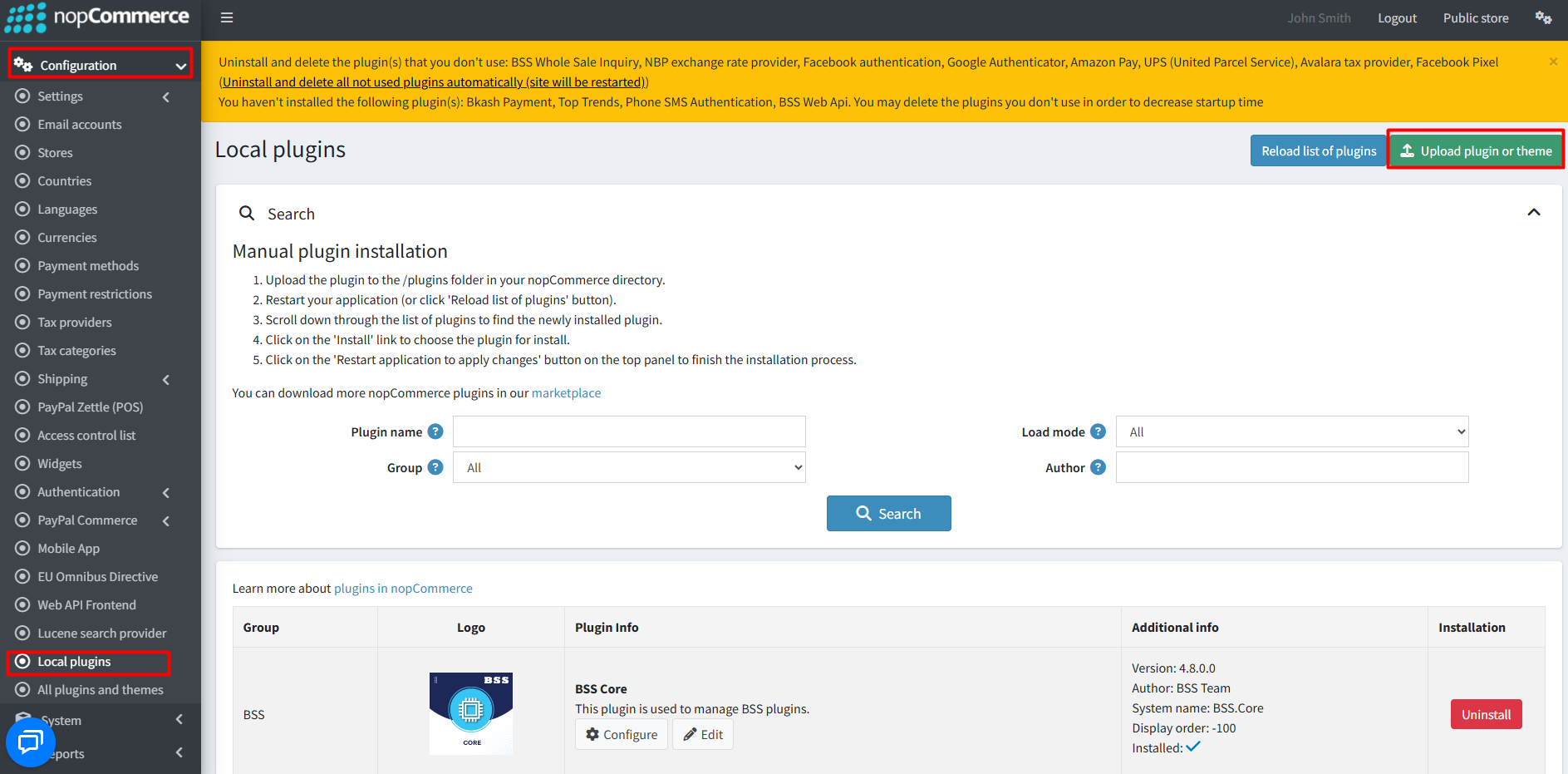
- Go to Administration → Configuration → Local plugins
- Within the bundle, you get all the required files, including BSS.Core
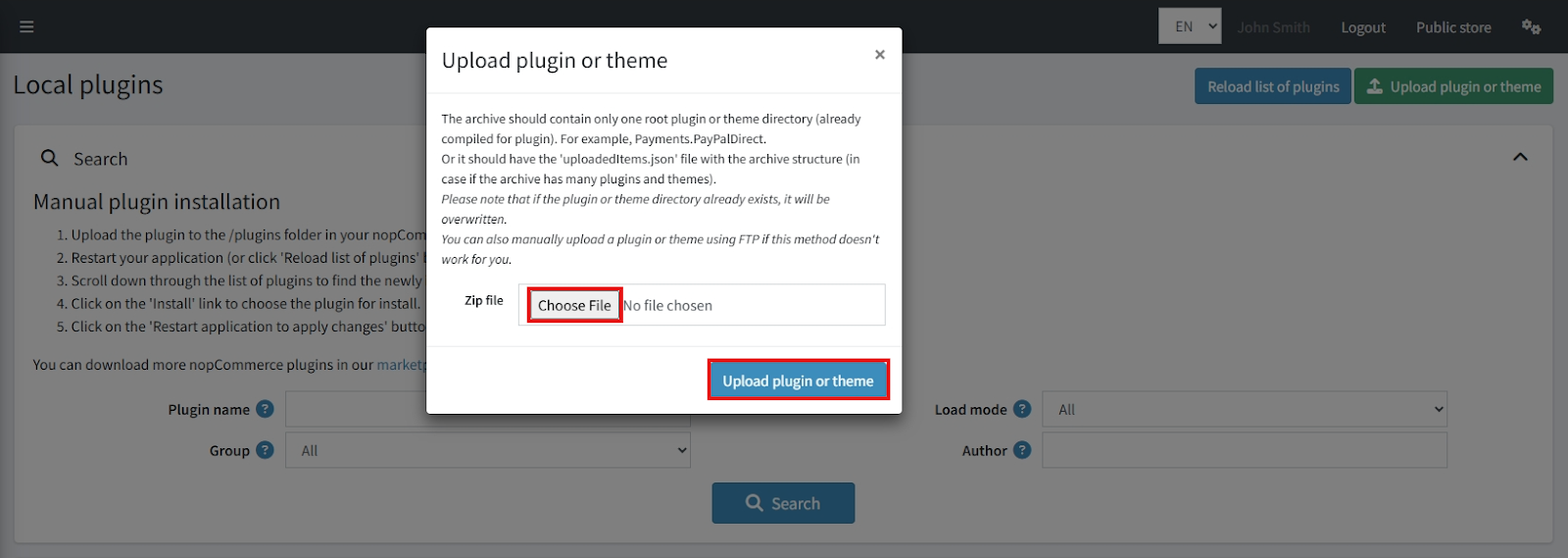
- Upload the zip files using the ‘Upload plugin or theme’ button
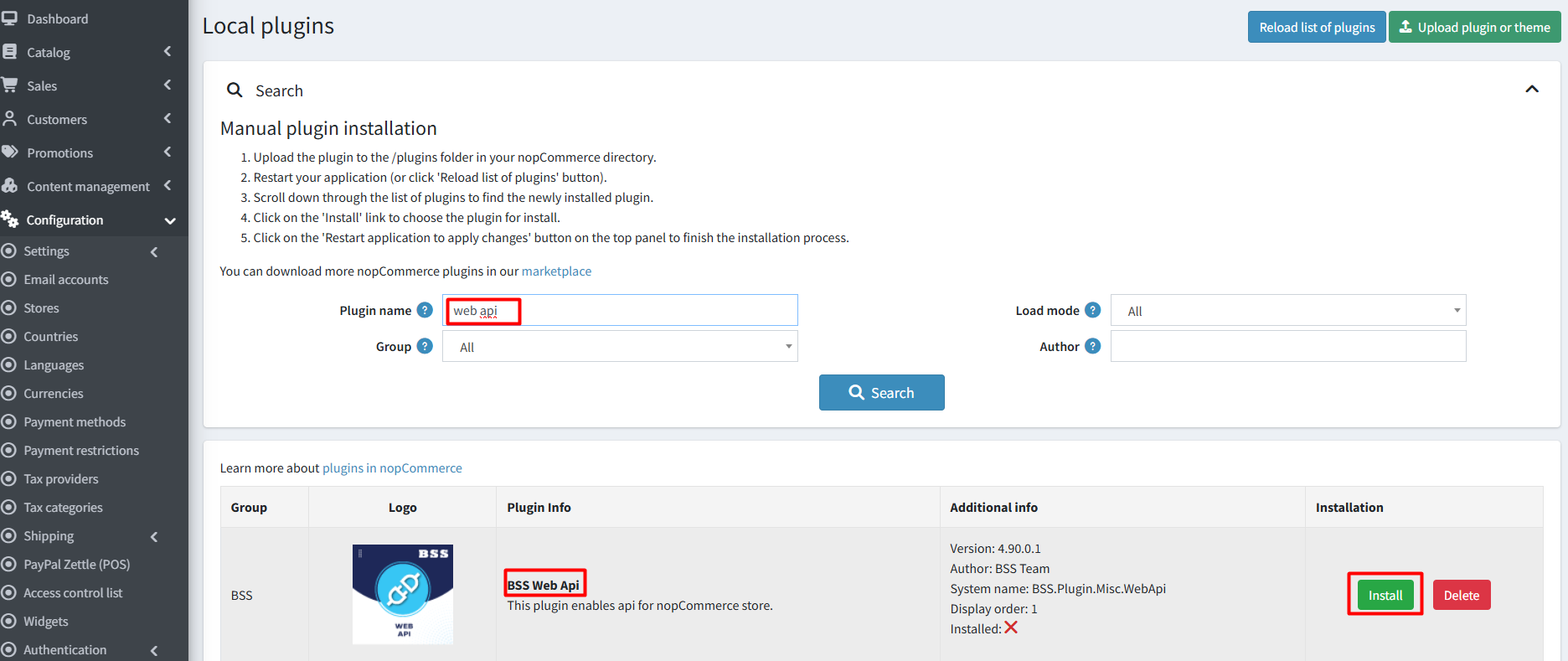
- Reload the plugin list and install ‘BSS Core’ first, then install ‘BSS WebApi’
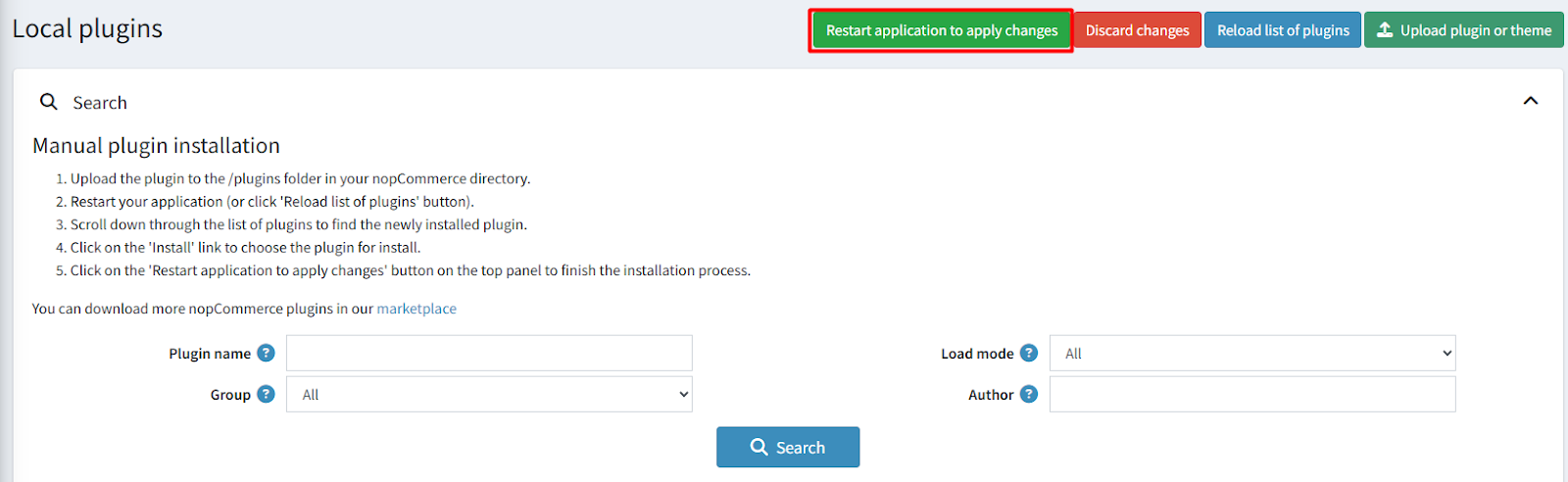
- Restart the application to activate the plugins
Recommendation: Go to > App Settings. If you find JavaScript bundling and minification, CSS bundling and minification are checked, then uncheck these two options and disable them.

CONFIGURATION
- Go to Admin → BSS → Plugins → WebApi → Configuration
- Enter the License string and click Save. Then clear cache.

- Revisit the Configuration page to adjust settings
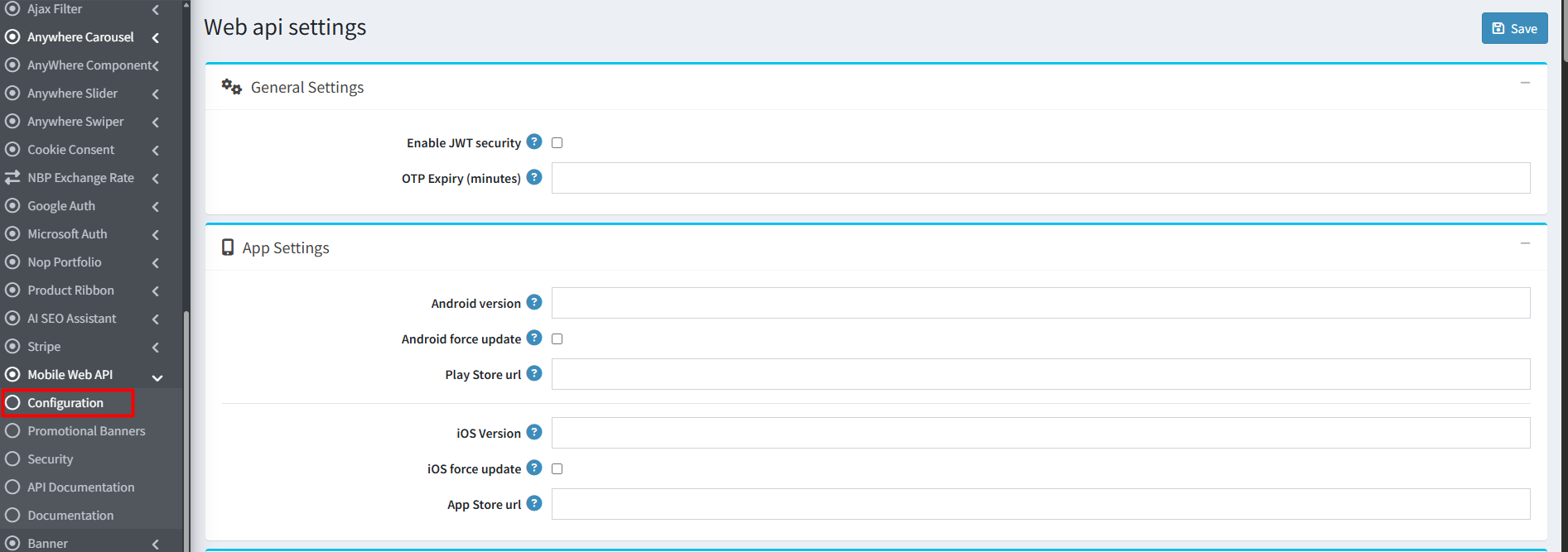
General Settings
- Enable JWT Security: Activates JWT authentication and requires an ‘NST’ header for API requests
- OTP Expiry (minutes): Define how long a One-Time Password remains valid
App Settings
- Android Version: Set current Android app version
- Android Force Update: Require users to update outdated versions
- Play Store URL: Provide Google Play Store link
- iOS Version: Set current iOS app version
- iOS Force Update: Enforce updates for outdated versions
- App Store URL: Provide Apple App Store link
Light Theme Settings
- Theme Name
- Upload Logo for Light Theme
- Primary & On Primary Colors
- Primary Container
- Secondary & On Secondary Colors
- Error & On Error Colors
- Background & On Background Colors
- Surface & On Surface Colors
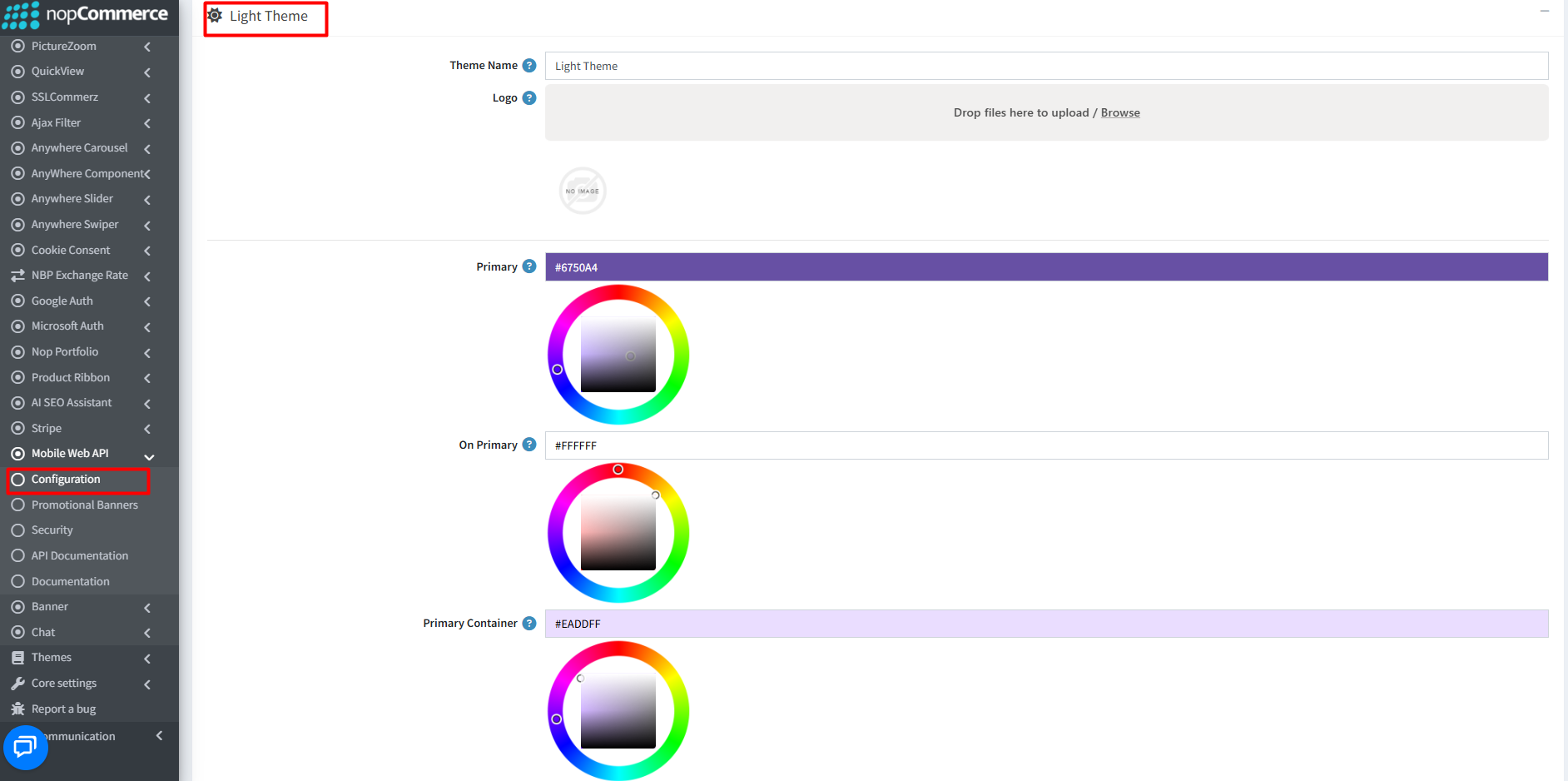
You can follow similar steps to configure the Dark Theme.
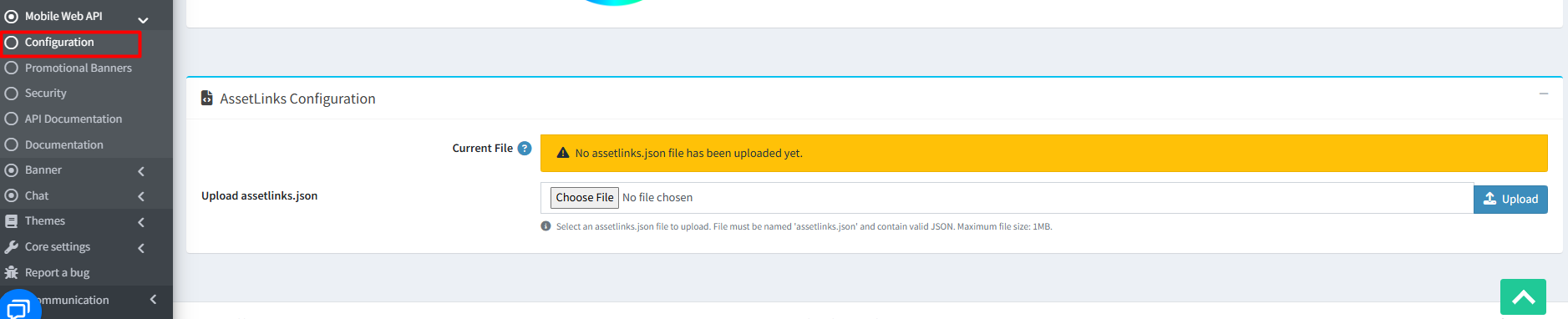
- AssetLinks Configuration: Upload a valid assetlinks.json file (max 1MB) to verify Android app association with your domain
CREATE / EDIT BANNER
- Go to Admin → BSS → Plugins → Mobile Web API → Promotional Banners
- Click Add new to create a banner
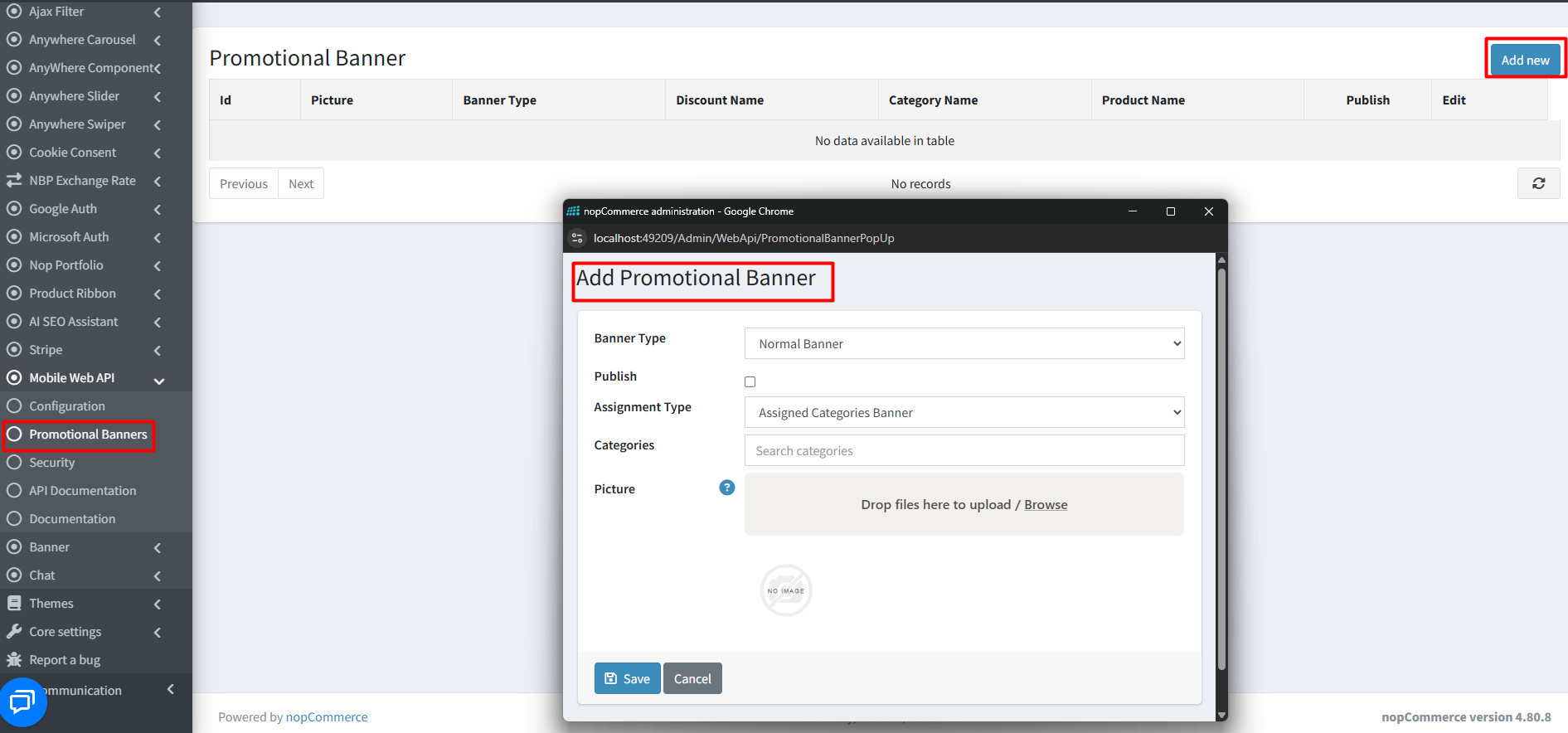
- Banner Type: Select from dropdown
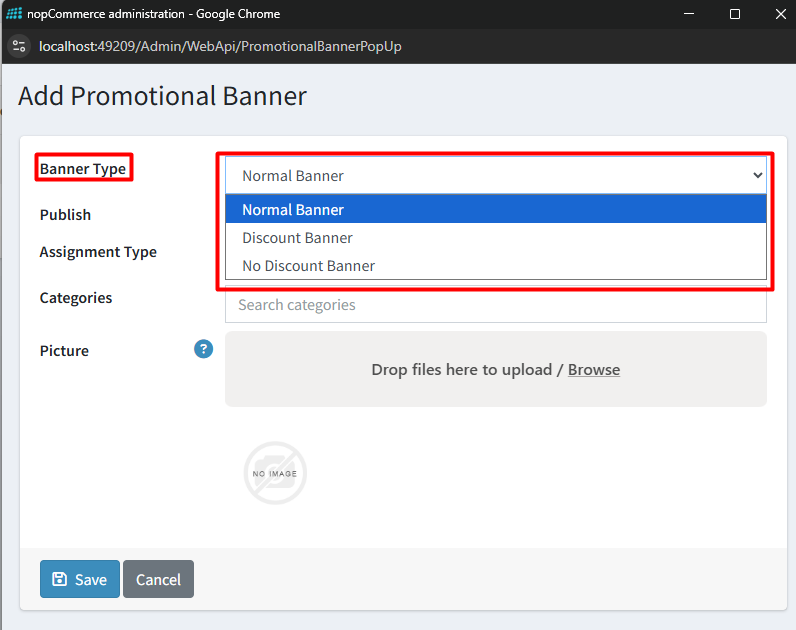
- Publish: Make banner visible in public store
- Assignment Type: Assign to Categories or Products
- Categories / Products: Select based on assignment type
- Picture: Upload multiple images (auto-resize supported)
- Click Save to publish
- Edit or delete banners anytime from the list
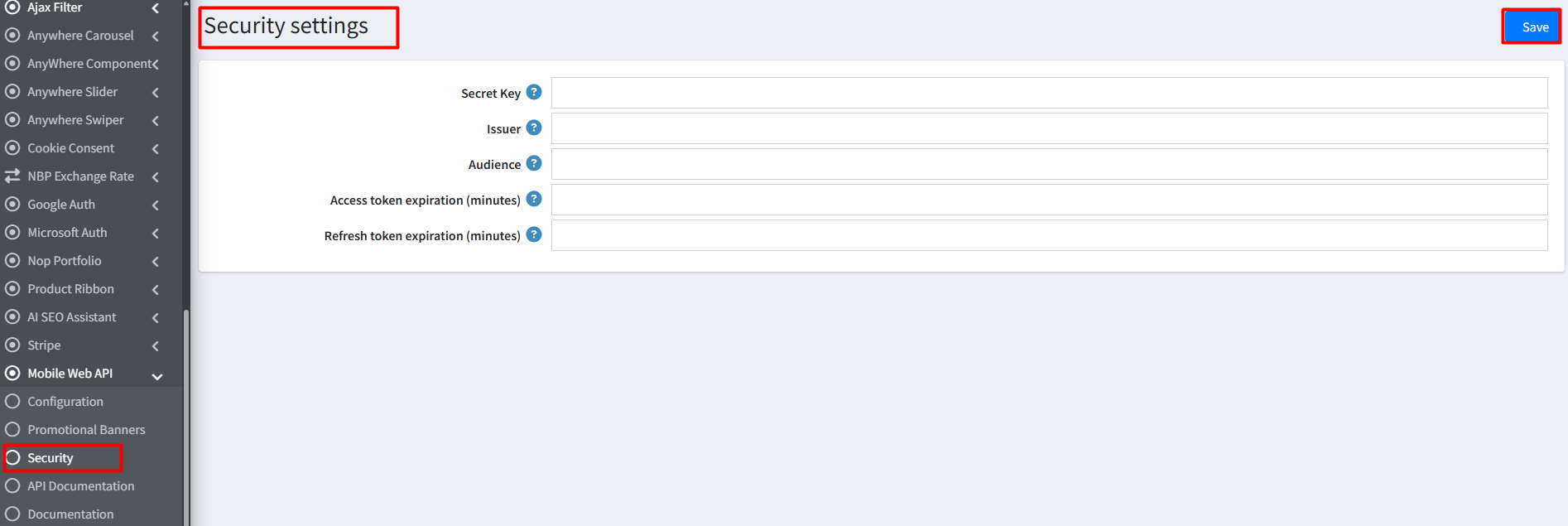
SECURITY SETTINGS
- Secret Key: Enter a unique 32+ character UTF-8 encoded key
- Issuer: Enter your Store URL
- Audience: Specify authorized client URLs
- Access Token Expiration: Define validity duration (minutes)
- Refresh Token Expiration: Define refresh token duration
- Click Save to apply security settings
API DOCUMENTATION
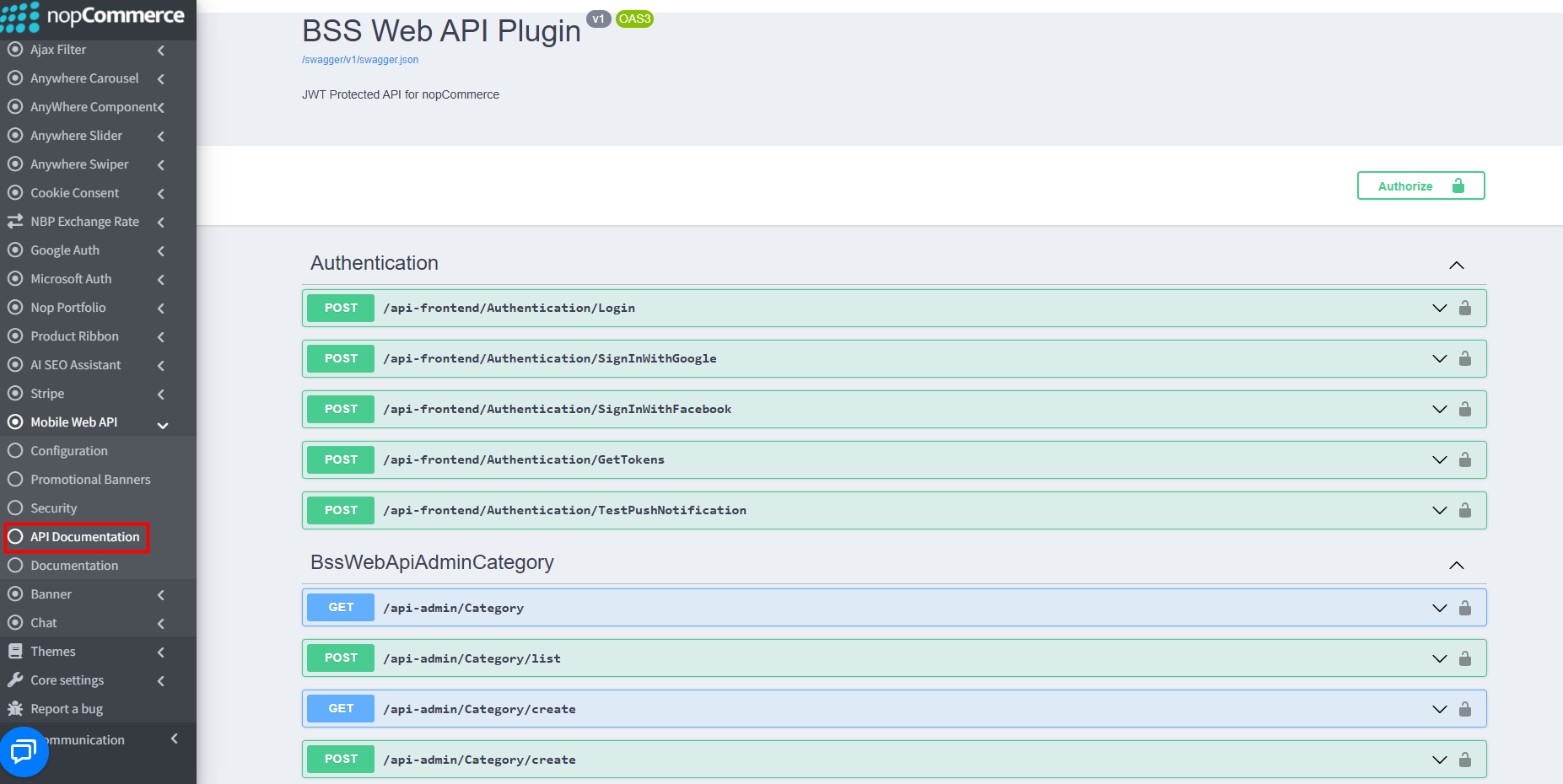
Interactive API Explorer (Swagger)
- Explore and test endpoints via integrated Swagger UI
- Navigate: Admin → Mobile Web API → API Documentation
- Raw documentation endpoint: {your_store_url}/swagger/v1/swagger.json
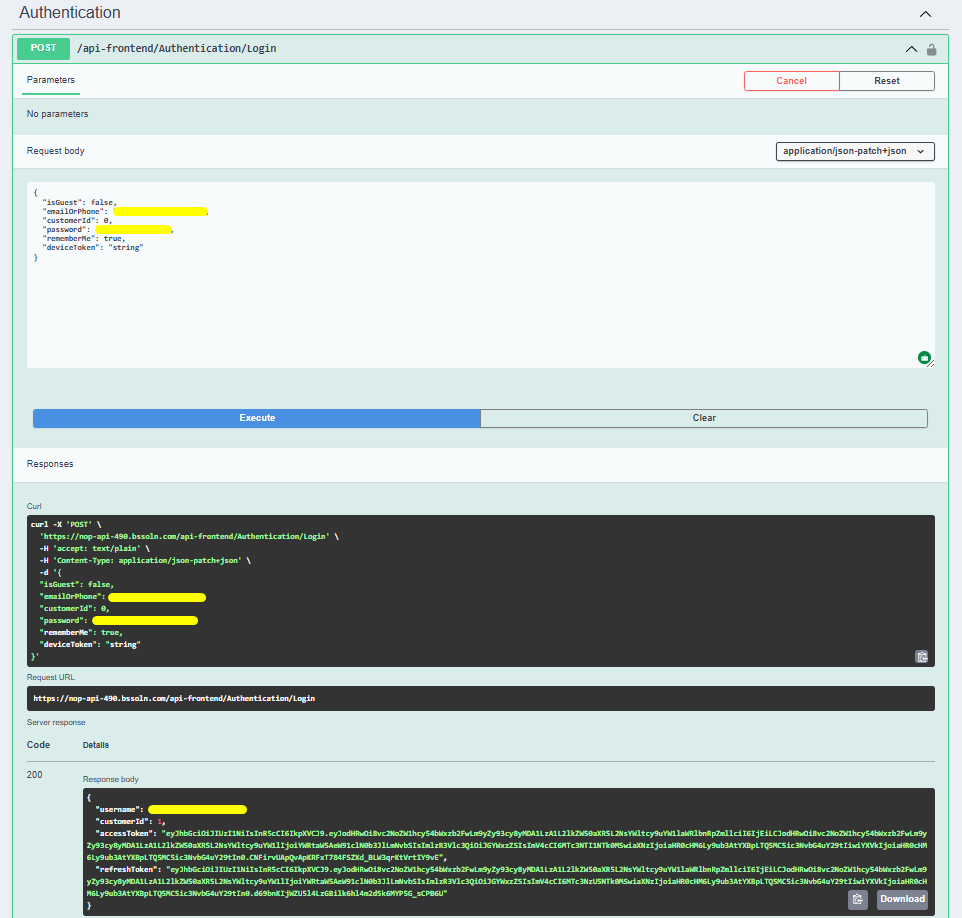
Authentication & Security
- Use Authentication endpoints (e.g., /Login or /GetTokens) to generate JWT tokens
- Ensure Secret Key, Issuer, and Audience are properly configured
Postman Integration
- Download BSS API Postman Collection
- Import collection into Postman
- Select your environment (e.g, ‘BSS_API’)
- Update BaseURL variable to your store URL
Documentation Menu
NopFashion Theme + 15 Plugin Bundle for NopCommerce
NopBeauty Theme + 12 Plugin Bundle for NopCommerce
NopNoor Theme + 16 Plugin Bundle for NopCommerce
NopGadget Theme + 18 Plugin Bundle for NopCommerce
NopEthnic Theme + 17 Plugin Bundle for NopCommerce
NopFurniture Theme + 19 Plugin Bundle for NopCommerce
NopPharma Theme + 16 Plugin Bundle for NopCommerce
NopVogue Theme + 17 Plugin Bundle for NopCommerce
NopGadence Theme + 18 Plugin Bundle for NopCommerce


